What is Amortization
Amortization is an accounting technique which involves the process of repaying a
loan over a time in regular
installments, which consist of both interests and principals.
Initially, the borrower pays a high interest and least principal but over time, the borrower pays a
decreasing amount of interest and an increasing amount of principal to the lender.
This process continues until the loan is fully paid off.
Amortization Calculation Formula
The formula for amortization is:
A = (P * r) / (1 - (1 + r)-n)
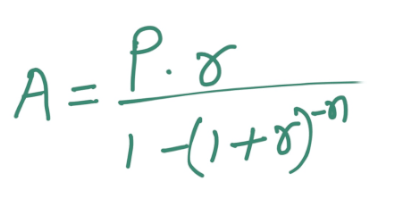
where:
- A = the payment amount per period or monthly amortization
- r = the monthly interest rate in the form of decimal
- P = the initial principal or loan amount
- n = the total number of payments
An example of calculation of amortization using this formula :
Let's consider you took the loan of $50,000 with annual interest of 5%, to be paid completely at the
end of 5
years.
Here's the value that you want to populate into the formula of amortization mentioned above.
The monthly interest rate would be (r):
r = 0.05/12 = 0.0041667 (the percentage is written here in decimal form)
The total number of payments (n) is multiplied with 12, so here n is:
n = 5 years x 12 months per year = 60 months (i.e, 60 payments)
Enter the values for r, P, and n into the formula to solve for the monthly payment amount or
amortization
value (A):
A = (0.0041667 * $50,000) / (1 - (1 + 0.0041667)^(-60))
A = $943.56
This gives the result as $943.56, Which is going to be your monthly loan payment.
Further, to calculate the portion of each payment that you need to pay as interest and principal,
you would need the outstanding balance at the beginning of each payment period. For example,
the beginning outstanding balance would be $50,000.
So, the interest portion of the payment would be calculated as:
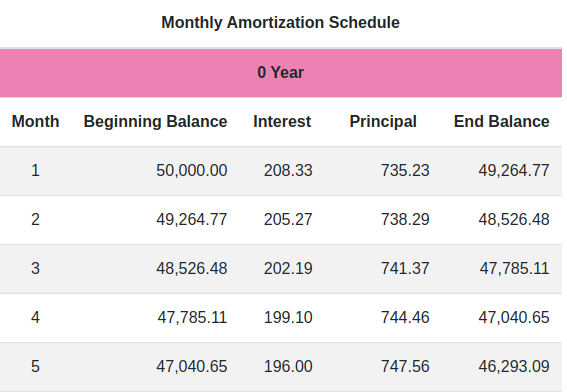
interest = $50,000 * 0.0041667 = $208.33
The part of the payment that is paid towards the principal would be:
principal = $943.56 - $208.33 = $735.23
Next, the outstanding balance for the second month would be calculated as:
outstanding balance = $50,000 - $735.23 = $49264.77
And so on, for each upcoming month until the loan is completely paid off, as in this case it’s the
60th
month.
What is Amortization Schedule or Table
Your Loan payment consists of partly interest and partly principal for the predetermined period of
time until
it is completely paid off.
While the payment amount remains the same for each period, the interest rate and the principal
varies for
each period.
When a borrower gets the loan from its lender, he also receives a table which consists of columns
with
“beginning balance”, “interest”, “principal” and “ending balance”. This table is simply called the
“Amortization Schedule”.
With the help of an amortization schedule, the borrower can keep track of the date of loan payment,
amount
due , interest due, principal due, and the remaining balance of the loan after each payment. As
payments are
made on a loan according to its amortization schedule, the proportion of each payment allocated
towards
interest decreases gradually, while the proportion allocated towards the principal amount increases
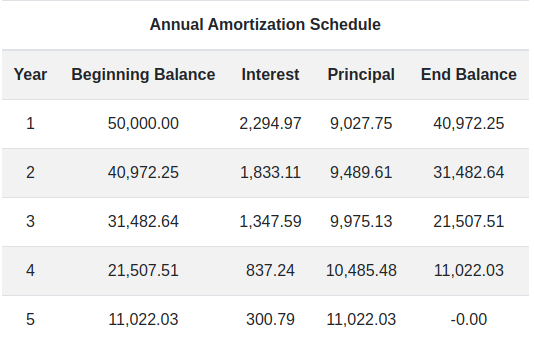
The table that shows yearly loan payment is termed as “Yearly Amortization Schedule”, whereas,
the table with monthly down payments is called as “Monthly Amortization Schedule”
In the picture below you can see the example of amortization schedule for monthly and yearly loan
payments.
About this Amortization Calculator
This amortization calculator is a free online financial tool to calculate
amortization online. It
lets you
find out what amount goes for interest and principal as loan payoff over monthly as well as
annually. In
comparison to other amortization calculators, it is easier to use and way better than using Excel
sheets. It
brings you accurate and detailed information in a blink.
As you input the required value like loan amount, term year and interest rate, it
takes you to the
new page
that provides all the repayment information along with charts and tables. The chart consists of
graphical
representations of the amount paid, interest for each month, and remaining balances. The table
includes rows
for each payment with columns that show the starting balance, interest rate, principal and the
remaining
balance. Borrower can take the help of this calculator, to compare and decide how much loan and for
what time
is going to be suitable for him.
How to use the Amortization Calculator for loan payment
Well, Calculating amortization on your own can be a daunting task, unless you're
using Excel sheets. Even then, filling in the formula and values manually can be a time-consuming
task. In such a situation, your best bet would be an online amortization calculator like this one.
Not only does it produce results instantly, but it also provides detailed information about the
amortization schedule, enabling you to make an informed decision about borrowing beforehand.
Calculate a loan payment (without extra payments)
Here’s the step by step process to use this calculator.
Step 1 : First you must fill in the loan amount (P) in the input field.
Step 2: Enter the year (n) in which you want to completely pay off the loan
Step 3 : At last enter the interest rate (r) at which you're taking the loan.
Step 4: Click on the 'calculate' button. This will generate a detailed result of your monthly
payments and the total cost of lending.
Calculate with extra payments (optional)
If you plan to pay more than your required monthly installment, the calculator can also show you how
much interest you will save and how much sooner your loan will be paid off.
Step 1 : Fill in the loan amount, term and interest rate just like the steps above.
Step 2 : Tick the "Optional : Make Extra Payments" checkbox to reveal the extra payment fields.
Step 3 : Enter any combination of an extra monthly payment, an extra yearly payment, or a one-time
lump-sum payment. You can also choose the payment number each extra payment starts at or applies to.
Step 4 : Click on the 'calculate' button. Along with the usual schedule, you'll see a savings summary
showing the interest saved, the time saved, and your new payoff date, with the amortization schedule
adjusted for your accelerated payoff.
Example: How to use this calculator
Suppose you want to take a $200,000 home loan for 30 years at a
9% annual interest rate. Here is exactly what you would type into each field:
| Field |
What to enter |
Example value |
| Loan Amount |
The total amount of money you are borrowing (the principal). You don't need to type
the "$" sign or commas. |
200000 |
| Year |
The number of years over which you want to fully repay the loan (the loan term). |
30 |
| Interest Rate |
The yearly interest rate your lender is charging, entered as a percentage. |
9 |
Click Calculate and you will see a monthly payment of about
$1,609.25, a total interest of $379,321.00, and a total repayment
of $579,321.00 — along with the full monthly and yearly amortization schedule
and charts.
Example with extra payments (optional)
Now suppose you can afford to pay $200 extra every month on the same loan. Tick the
"Optional : Make Extra Payments" box and fill in the extra-payment fields:
| Field |
What to enter |
Example value |
| Extra monthly payment |
An additional amount added to every monthly payment, paid straight towards the
principal. |
200 |
| Starting at payment # |
The payment number from which the extra monthly amount begins (use 1 to start from
the very first month). |
1 |
With just $200 extra per month, this loan is paid off in about 19 years and 9 months
instead of 30 years, saving roughly $151,580 in interest. The result page shows this
as a savings summary.